
In this blog post, you’ll learn how to code and build a GPT LLM from scratch or fine-tune an existing one. We’ll cover the architecture, key tools, libraries, frameworks, and essential resources to get you started fast.
Table of contents
Building your own GPT-style large language model (LLM) has never been more accessible. Thanks to open-source projects, accessible ML frameworks, and cloud compute platforms, developers can now prototype and train their own LLMs with a combination of pre-trained models and custom datasets.
Understanding GPT LLM Architecture
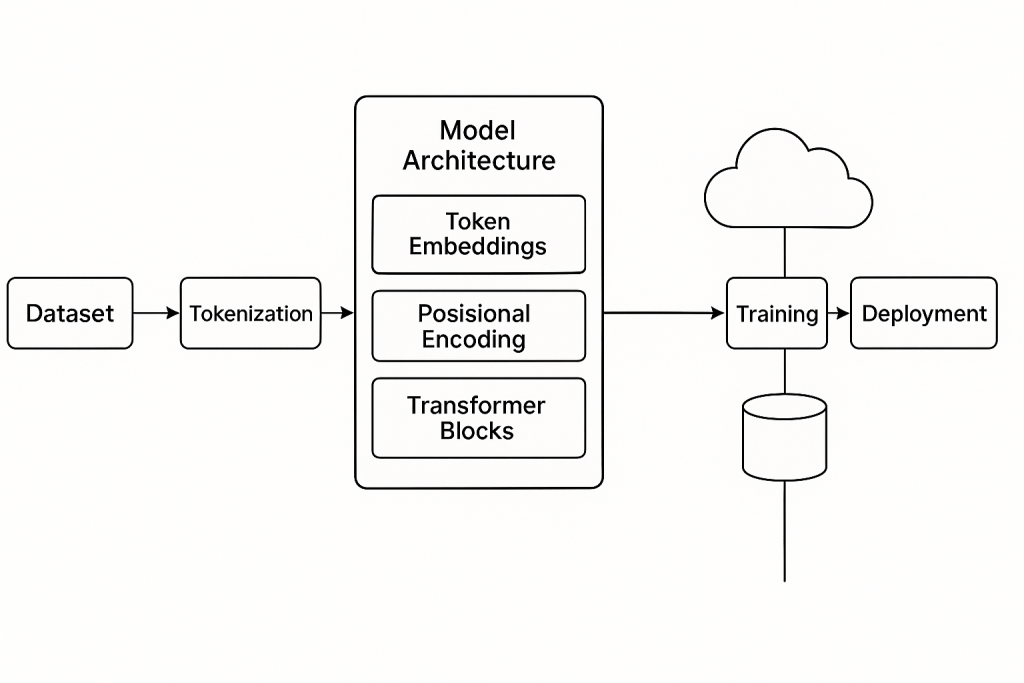
At its core, a GPT (Generative Pre-trained Transformer) model is based on the Transformer decoder architecture. It takes a sequence of tokens (words or subwords), uses masked self-attention to predict the next token, and stacks multiple transformer layers to scale performance.
Key components include:
- Tokenization: Converts text into numerical tokens.
- Embedding Layer: Maps tokens to high-dimensional vectors.
- Positional Encoding: Injects token position into the model.
- Masked Multi-head Self Attention: Allows the model to focus on relevant parts of input history.
- Feed-forward layers: Processes the output of attention heads.
- Layer Normalization & Residual Connections: Helps with gradient flow and convergence.
- Softmax Output: Converts logits into probabilities for each token.
Model Architecture Diagram
Tools and Libraries to Build a GPT Model
You don’t have to start from zero. Here are the most popular tools and frameworks used to build, train, and deploy GPT-style models:
1. Python
Python is the programming language of choice. Its ecosystem supports deep learning, tokenization, and model deployment.
2. PyTorch / TensorFlow
These are the most common deep learning frameworks. PyTorch is widely used for research and quick prototyping, while TensorFlow excels at production and mobile/edge deployment.
Install with:
tpip install torch
# or
pip install tensorflow
3. Hugging Face Transformers
This open-source library provides pre-built GPT models, tokenizers, and training utilities. It allows you to fine-tune GPT-2, GPT-Neo, GPT-J, and other variants with minimal code.
pip install transformersExample:
from transformers import GPT2LMHeadModel, GPT2Tokenizer

tokenizer = GPT2Tokenizer.from_pretrained("gpt2")
model = GPT2LMHeadModel.from_pretrained("gpt2")
4. Datasets
Use open-source datasets from Hugging Face datasets, Kaggle, or build your own. For fine-tuning, format your dataset as JSONL with prompt-response pairs or plain text sequences.
pip install datasets5. Tokenizers (tiktoken / Hugging Face)
Tokenization is critical. GPT models usually use Byte Pair Encoding (BPE). tiktoken is used by OpenAI models and is highly efficient.
pip install tiktoken6. Accelerate / DeepSpeed
For training larger models, use Accelerate (from Hugging Face) or DeepSpeed (from Microsoft) to handle multi-GPU and memory optimization.
pip install accelerate deepspeed7. Weights & Biases / TensorBoard
Track training metrics, loss curves, and model checkpoints using logging tools.
Building the Model: Step-by-Step
Here’s a high-level breakdown of how to code and build a GPT LLM:
Step 1: Prepare Your Dataset
- Clean your text (remove junk characters)
- Tokenize with BPE
- Split into train/validation
- Format it into token sequences (n-grams or sliding window)
Step 2: Define the Model Architecture
Use PyTorch or Hugging Face to instantiate a model class. For custom GPTs:
from transformers import GPT2Config, GPT2LMHeadModel

config = GPT2Config(
    vocab_size=50257,
    n_positions=1024,
    n_ctx=1024,
    n_embd=768,
    n_layer=12,
    n_head=12
)

model = GPT2LMHeadModel(config)
Step 3: Train the Model
Use Trainer API from Hugging Face or a custom training loop.
from transformers import Trainer, TrainingArguments

args = TrainingArguments(
    output_dir="gpt-output",
    evaluation_strategy="steps",
    per_device_train_batch_size=4,
    per_device_eval_batch_size=4,
    num_train_epochs=3,
    save_steps=500
)

trainer = Trainer(
    model=model,
    args=args,
    train_dataset=train_ds,
    eval_dataset=val_ds
)

trainer.train()
Step 4: Save and Deploy
Save your model and tokenizer:
model.save_pretrained("my-gpt")
tokenizer.save_pretrained("my-gpt")
Deploy via:
- Flask/FastAPI for REST API
- Streamlit/Gradio for demo apps
- Hugging Face Spaces
- Azure ML or AWS SageMaker for scalable serving
Hardware and Compute
Training a GPT from scratch (especially models with billions of parameters) requires GPUs — ideally A100s or H100s. If you’re limited on compute, fine-tuning a smaller model like GPT-2 or GPT-Neo on cloud GPUs (e.g., Google Colab Pro, Azure ML, AWS EC2) is a great option.
Summary
Building your own GPT-style LLM can be both educational and powerful. Whether you’re experimenting with small models or fine-tuning large ones, the open-source tools available today allow anyone with Python skills to get started. Keep iterating, learn from your training results, and don’t forget to monitor costs when using cloud GPUs.
Discover more from CPI Consulting
Subscribe to get the latest posts sent to your email.