
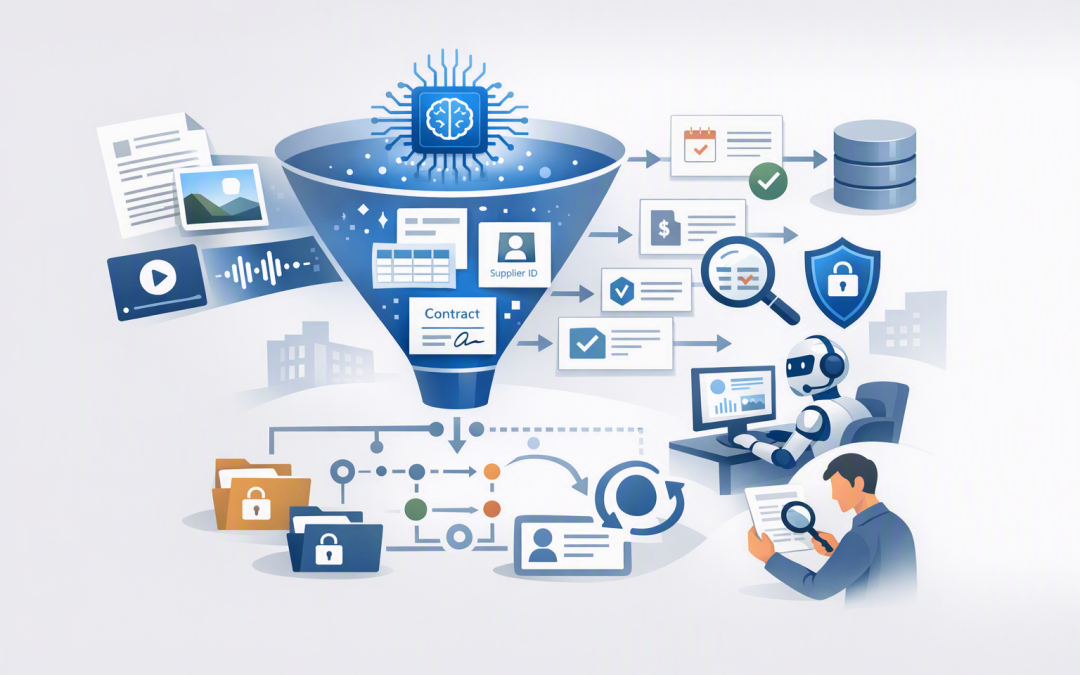
In this blog post How Azure Content Understanding Makes Document Data Agent-Ready we will explain how to turn scattered, inconsistent business documents into reliable information that AI agents can actually use.
Most organisations do not have a shortage of data. They have contracts in SharePoint, invoices in email, procedures on network drives, scanned forms in archives, and several versions of the same policy circulating in Microsoft Teams.
That may be manageable when employees search for information manually. It becomes a serious problem when an AI agent is expected to answer questions, review documents or trigger business processes without using outdated, incomplete or restricted information.
What Azure Content Understanding actually does
Azure Content Understanding is a Microsoft Foundry service that converts documents, images, audio and video into organised, machine-readable information. In plain English, it helps software understand what a file contains rather than simply recognising the words inside it.
Traditional document scanning can identify text on a page. Azure Content Understanding goes further by recognising tables, sections, relationships and business fields such as contract dates, supplier names, payment terms and compliance obligations.
The central technology is an analyser. An analyser is a reusable set of instructions describing what type of content is being processed, what information should be found and how the result should be structured.
Microsoft provides prebuilt analysers for common content such as invoices, receipts, identity documents and contracts. Organisations can also create custom analysers for their own forms, reports and industry-specific documents.
Why ordinary document storage is not agent-ready
An employee can open a 70-page contract and work out which clauses matter. An AI agent needs more preparation if it is expected to do this consistently, securely and at scale.
Agent-ready data normally needs five qualities:
- Structure: Important details must be separated into clear fields rather than buried in paragraphs.
- Context: The data should identify the document type, owner, business unit and relevant dates.
- Traceability: An answer should be connected to the page, table or section that supports it.
- Permission: The agent must only retrieve information the user is authorised to see.
- Freshness: Superseded policies and expired contracts must not be treated as current.
Without these controls, an agent may produce a polished answer based on the wrong document. That is often more dangerous than returning no answer at all.
How a document becomes usable by an AI agent
A practical Azure Content Understanding pipeline usually follows a simple sequence.
- A document enters through an approved source such as SharePoint, Azure Storage or a business application.
- The document is classified so the system knows whether it is an invoice, contract, application, report or another content type.
- The appropriate analyser extracts text, tables and defined business fields.
- Confidence information and source grounding are recorded so questionable results can be reviewed.
- The structured result is validated and stored or indexed in Azure AI Search.
- An AI agent searches this approved information when answering questions or completing a task.
The output can include both readable Markdown and structured JSON. JSON is simply a consistent format that applications can process, similar to putting every document into the same well-labelled digital form.
An illustrative contract result might look like this:
{
 "documentType": "supplier_contract",
 "supplier": "Example Services Pty Ltd",
 "renewalDate": "2027-06-30",
 "automaticRenewal": true,
 "noticePeriodDays": 90,
 "riskLevel": "medium",
 "accessGroup": "Procurement",
 "reviewRequired": false
}
This structure allows an agent to answer questions such as “Which supplier contracts require notice this quarter?” without reading every contract from the beginning each time.
Start with the business decision, not the document library
A common mistake is attempting to process every file the organisation owns. That creates cost, delay and a large collection of structured data with no clear purpose.
Start with one decision or workflow. For example, identify upcoming contract renewals, validate supplier invoices, summarise insurance coverage or check whether project reports contain mandatory information.
Then define the fields required to support that outcome. If procurement wants to manage renewals, it may need the supplier, contract owner, expiry date, notice period, renewal conditions and supporting clauses.
Clear field descriptions matter. “Date” is vague, while “the final date on which notice can be issued to prevent automatic renewal” gives the analyser useful business context.
Use confidence and evidence to control risk
Document automation should not be treated as an all-or-nothing decision. High-confidence results can move forward automatically, while uncertain or high-impact results can be sent to a person for review.
For example, an invoice number may be safe to accept automatically when it is clearly visible. A finding that a contract contains an unlimited liability clause should normally be confirmed by legal or procurement staff.
Azure Content Understanding can also ground extracted information in its source. This means reviewers can see where the information came from rather than trusting an unexplained AI answer.
Agentic mode can perform more complex work, such as connecting evidence from different sections, checking conditions and performing calculations. As of August 2026, this capability remains in preview, so it should be tested carefully rather than used as the only control for high-impact production decisions.
Keep security attached to the content
Turning a restricted document into a search index must not remove its restrictions. Permissions, sensitivity labels, retention rules and business ownership need to follow the information through the entire process.
Access should be controlled through Microsoft Entra ID, which manages user and application identities. Managed identities can allow Azure services to communicate without storing passwords, while private endpoints can keep service traffic off the public internet.
Microsoft Defender and Wiz can then help identify unsafe configurations, excessive access and cloud security gaps. For a broader control checklist, see our guide to security best practices for Azure AI services.
The Essential 8, the Australian Government’s baseline cybersecurity framework, remains important for areas such as access control, patching and application protection. However, it does not replace AI-specific controls covering data quality, agent permissions, evidence and human approval.
The business case is usually hidden in manual handling
Consider a 200-person organisation where six employees each spend five hours a week finding documents, copying details into systems and checking which version is correct. Across 48 working weeks, that represents 1,440 hours.
At an estimated loaded employment cost of $60 per hour, the process costs about $86,400 a year before errors, missed renewals or delayed customer responses are considered.
Automating every hour would be unrealistic. But reducing that workload by half could release more than $40,000 of productive capacity each year while improving consistency and auditability.
The strongest business case is therefore rarely “we want AI.” It is “we need to reduce the time and risk involved in this specific document process.”
A sensible path from chaos to production
Begin with one document type, one business owner and a measurable outcome. Test representative files, including poor scans, unusual layouts and incomplete documents rather than using only perfect examples.
Once extraction is reliable, connect the approved output to a governed retrieval layer. Our guide to designing agentic retrieval with Azure AI Search Knowledge Sources explains how agents can find trusted business information without searching everything indiscriminately.
The agent itself also requires a secure identity, limited permissions, monitoring and clear approval boundaries. These controls are covered in designing secure AI agent infrastructure on Azure.
If you are ready to test the process, use our 30-day Azure Content Understanding pilot guide to define scope, security controls and success measures before committing to a production rollout.
Better agents begin with better information
Azure Content Understanding can turn document collections into structured, searchable and traceable business information. But the real value comes from combining the technology with clear ownership, strong permissions, measurable workflows and sensible human review.
CloudProInc is a Melbourne-based Microsoft Partner and Wiz Security Integrator with more than 20 years of enterprise IT experience. We help organisations across Australia and internationally connect Azure, Microsoft 365, AI and security controls without introducing unnecessary complexity.
If you are unsure whether your document estate is ready for AI agents, we are happy to assess one high-value workflow and show you where the opportunity, cost and risk sit — no strings attached.
Discover more from CPI Consulting
Subscribe to get the latest posts sent to your email.