
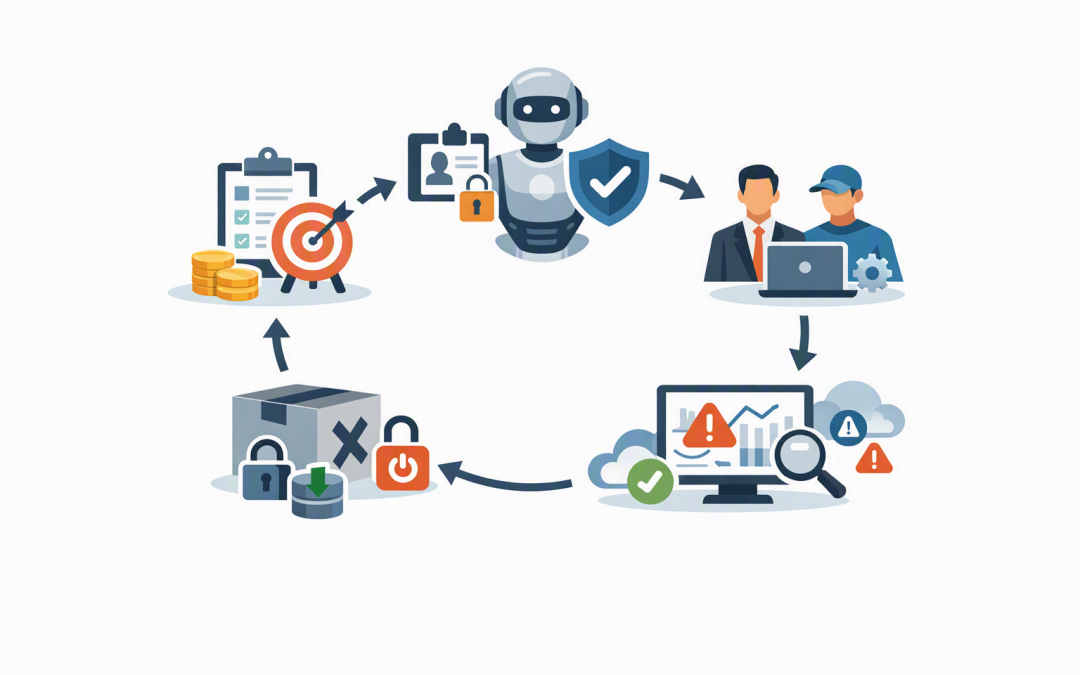
In this blog post The Complete AI Agent Lifecycle From Onboarding to Offboarding we will explain how to manage an AI agent from its first approval through to its final shutdown, without leaving behind unnecessary access, sensitive data or ongoing cloud costs.


The problem is rarely the first agent. It starts when a successful pilot becomes ten agents spread across finance, customer service, sales and IT. Six months later, nobody can confidently say who owns them, what information they can access or whether the original business need still exists.
An AI agent is software that can understand a goal, make decisions and take actions using connected business systems. Unlike a basic chatbot, it might read a shared mailbox, update a customer record, prepare a report or send a request to another agent.
That ability to act is what makes agents useful. It is also why they need a defined lifecycle rather than being treated as experiments that can remain online indefinitely.
Why the agent lifecycle is a business issue
Most organisations already have processes for onboarding and offboarding employees. A new starter receives an identity, approved access, equipment and a manager. When that person leaves, their access is removed and their assets are recovered.
AI agents need a similar model. As we covered in why managing AI agents like users is the only model that scales, every agent should have an identity, defined permissions and an accountable owner.
The lifecycle takes that principle further. It creates a repeatable process for approving, operating, reviewing and eventually retiring each agent. The business outcomes are lower risk, clearer accountability and less money wasted on forgotten services.
Stage one starts with a business case, not a technology demo
Agent onboarding should begin before anyone connects a model to company data. The first question is not which AI platform to use. It is what business problem the agent will solve and how success will be measured.
A useful onboarding record should answer:
- Purpose: What task will the agent perform?
- Expected outcome: Will it save staff time, reduce errors, improve response times or lower costs?
- Business owner: Who is accountable for the result?
- Technical owner: Who will maintain, monitor and support it?
- Data access: What company or customer information does it need?
- Action limits: What can it do automatically, and what requires human approval?
- Review date: When will the business decide whether to continue, change or retire it?
This prevents an interesting demonstration from quietly becoming an unmanaged production system. It also gives finance and leadership a clear way to determine whether the agent is delivering value.
Stage two gives the agent its own identity and boundaries
An agent should not use an employee’s username, password or personal access token. It should have its own digital identity so the business can see exactly what it accessed and what actions it performed.
Within Microsoft environments, Microsoft Entra Agent ID can provide identities designed for AI agents. Microsoft Entra is the identity system that controls who, or what, can access company applications and information.
Platforms such as Microsoft Foundry can then use that identity when an agent connects to approved tools. A tool is simply a system the agent can use, such as SharePoint, Azure Storage, a customer database or an internal application.
The important principle is least privilege. This means giving the agent only the access required for its specific job. An invoice-processing agent may need to read one finance mailbox, but it should not automatically receive access to every mailbox or document library.
Credentials must also be protected. Passwords and system access keys should never be placed inside an agent’s instructions. Managed identities, which allow approved systems to connect without storing passwords in code, provide a safer option where supported.
Stage three assigns ownership that survives staff changes
Every agent needs one accountable business owner. A committee can advise, but a committee cannot answer a security incident call at 8am and decide whether the agent should be disabled.
The business owner decides whether the agent remains useful and appropriate. The technical owner handles monitoring, updates, access changes and support. For agents using sensitive information, a privacy, risk or compliance representative may also need to review major changes.
Ownership should be recorded in a central agent register alongside the agent’s purpose, identity, permissions, integrations, cost centre and review date. If the owner changes roles or leaves the organisation, reassignment should be part of that person’s offboarding process.
This is especially important for businesses working towards Essential 8 maturity. Essential 8 is the Australian Government’s cybersecurity framework that helps organisations reduce common security risks. While it is not an AI-specific checklist, its focus on controlled access, secure administration, updates and monitoring should extend to non-human identities such as agents.
Stage four monitors value, behaviour and cost
Approval is not permanent. An agent’s access, performance and business value should be reviewed regularly, with higher-risk agents reviewed more often.
Leaders should receive practical measures rather than technical dashboards. These might include hours saved, cases completed, errors requiring correction, human escalations, customer complaints, security alerts and monthly operating costs.
Changes also need control. Updating an agent’s instructions, AI model, memory, permissions or connected tools can significantly change its behaviour. The updated version should be tested and approved before it reaches users.
If several agents hand work to one another, document those dependencies. Our guide to AI agent orchestration patterns explains how these handoffs work. Without a dependency map, retiring one agent may unexpectedly break several workflows.
Monitoring also needs to cover memory. Decide what the agent should retain, how long it should keep it and when it must be deleted. The risks are explored further in whether an AI agent should remember every customer conversation.
The offboarding stage most organisations forget
Imagine a 180-person professional services business that creates an agent to prepare weekly project reports. The project sponsor later leaves, the reporting process changes and employees stop using the agent.
The agent still has access to project files, an active connection to a shared mailbox and cloud resources generating monthly charges. Because it is no longer visible to staff, everyone assumes it has disappeared. Technically, it is still operational and potentially accessible.
A safe offboarding process should include:
- Stop the agent from accepting new work.
- Check whether other agents or business processes depend on it.
- Disable its identity and revoke access to connected systems.
- Remove stored credentials, system keys and third-party connections.
- Archive the logs needed for audit, investigation or compliance.
- Delete or retain memory and business data according to approved policies.
- Shut down unused endpoints, licences and cloud resources.
- Notify affected employees and process owners.
- Mark the agent as retired in the central register.
- Monitor for unexpected activity or charges after retirement.
Do not simply delete the agent first. Disabling it creates a controlled pause in which the team can preserve evidence, confirm dependencies and restore service if an unexpected business impact appears.
Build offboarding into onboarding
The easiest way to avoid forgotten agents is to define the exit process before launch. Every new agent should have an expiry or review date, a named owner, a documented shutdown procedure and an emergency stop option.
The operational controls described in our guide to operationalising Microsoft Agent Framework in production can also help teams trace agent activity, manage failures and establish a practical support model.
CloudProInc approaches agent governance with the same care applied to users, devices and cloud services. As a Melbourne-based Microsoft Partner and Wiz Security Integrator with more than 20 years of enterprise IT experience, we help organisations connect AI innovation with practical identity, security and cost controls.
If you are unsure how many agents are operating in your business, who owns them or what would happen if one needed to be shut down tomorrow, we are happy to help you map the lifecycle and identify the gaps — no strings attached.
Discover more from CPI Consulting
Subscribe to get the latest posts sent to your email.