
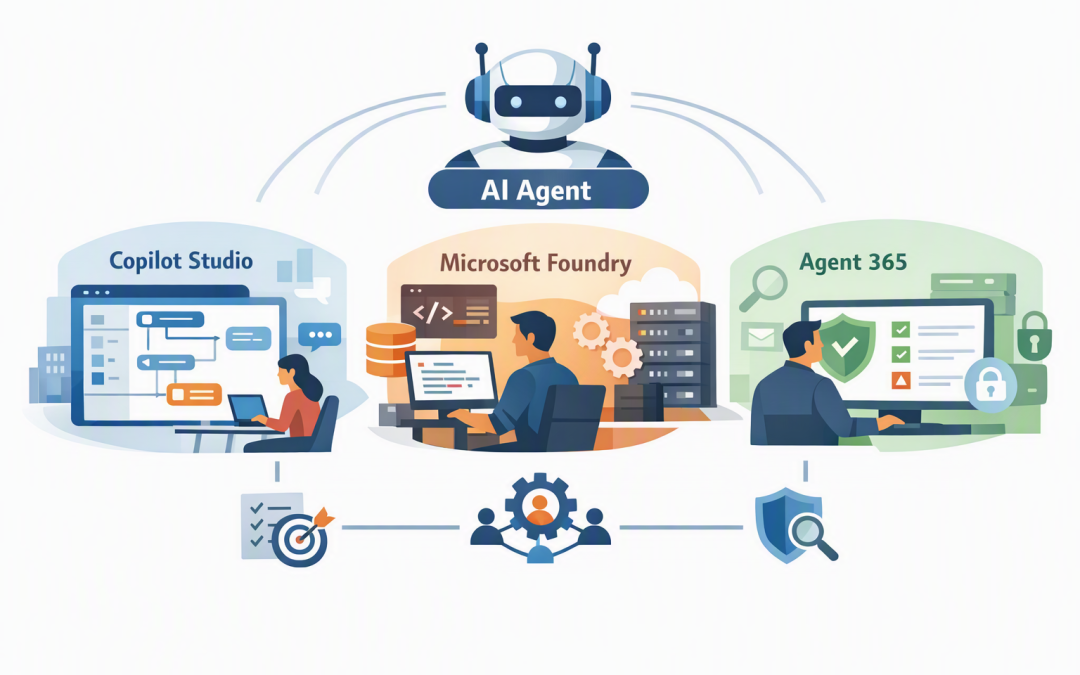
In this blog post Agent 365 vs Copilot Studio vs Microsoft Foundry for Business we will explain why three products that all mention AI agents solve very different problems. Choosing the wrong one can leave you paying for an engineering platform you do not need, or deploying agents without enough security and oversight.


At a high level, Copilot Studio is the workshop for creating business agents with minimal coding. Microsoft Foundry is the engineering platform for building custom AI systems, while Agent 365 is the control tower used to monitor, govern and secure agents after they enter your organisation.
First, what is an AI agent?
An AI agent is software that can understand a request, find relevant information and take approved actions. Unlike a basic chatbot, an agent may complete several steps, such as checking a customer record, drafting a response and creating a follow-up task.
The technology usually combines an AI model, company knowledge, business system connections and a set of permissions. The model might come from OpenAI, Anthropic Claude, Microsoft or another provider, but the model is only one part of the finished system.
The important business question is not simply, “Which model are we using?” It is, “What can this agent see, what can it change, and who is responsible when it gets something wrong?”
The short answer
- Copilot Studio builds business agents quickly. It is best for internal assistants, customer-facing conversations and structured workflows connected to Microsoft 365 and other business systems.
- Microsoft Foundry builds customised AI products. It gives developers greater control over models, data retrieval, integrations, testing, hosting and application design.
- Agent 365 governs the agent workforce. It helps IT and security teams discover, register, monitor and protect agents across the organisation.
These products are not three versions of the same tool. In a mature environment, a business may use all three together.
Agent 365 is the control tower
Agent 365 is designed for organisations reaching the point where employees, departments and developers are creating agents faster than IT can track them. It provides a central registry so administrators can see which agents exist, who owns them and how they are being used.
It extends familiar Microsoft controls to AI agents. Microsoft Entra provides agent identities and access controls, Microsoft Purview helps protect sensitive information, and Microsoft Defender looks for security risks and suspicious activity.
In plain English, Agent 365 helps stop an agent from becoming an invisible digital employee with excessive access and no accountable owner.
Use Agent 365 when
- Different departments are creating agents independently.
- You need an auditable record of agent ownership, access and activity.
- Agents can read sensitive financial, customer, legal or employee data.
- You have agents built outside Microsoft that still require central oversight.
- Your board or risk team is asking how AI is being controlled.
Agent 365 does not replace Copilot Studio or Foundry. Buying it will not automatically create a useful customer service agent or automate an approval process. Its main job is to provide visibility, identity, security and governance.
Copilot Studio is the practical business builder
Microsoft Copilot Studio is a graphical, low-code platform. Low-code means teams can create agents and workflows using visual tools and prebuilt connections instead of writing an entire application from scratch.
It is a strong option when the agent needs to work with Microsoft 365, Teams, SharePoint, Dynamics 365, Power Platform or common business systems. An HR team could create an agent that answers policy questions, while an operations team could build one that collects information and starts an approval process.
Copilot Studio can also create predictable agent flows. These follow defined steps, making them useful when a process must produce a consistent outcome rather than allowing the AI model to decide everything itself.
Use Copilot Studio when
- The users already work in Teams, Microsoft 365 or a web portal.
- A business team needs to help shape and maintain the agent.
- The process relies on common connectors and structured workflows.
- You want to test an idea without funding a full software project.
- The agent needs to answer questions from approved company content.
The trade-off is that low-code does not mean no planning. Poor permissions, outdated SharePoint content and badly designed workflows can still produce an agent that gives unreliable answers or exposes information to the wrong people.
Microsoft Foundry is the engineering platform
Microsoft Foundry is intended for developers and AI engineering teams building customised agents, applications and model-based services. It supports a broad catalogue of models, including options from Microsoft, OpenAI and Anthropic, so organisations are not limited to one model for every task.
Foundry provides more control over how an agent reasons, retrieves company information, calls tools, handles memory and connects to custom applications. It also supports testing and evaluation, which help teams measure whether an agent is accurate, safe and useful before wider deployment.
For example, an insurer might need an agent embedded inside a claims platform. The agent may need to analyse documents, apply business rules, consult several data sources and produce a result in a very specific format. That is more likely to suit Foundry than a simple low-code build.
Use Microsoft Foundry when
- You are creating a custom AI application or customer product.
- You need detailed control over model choice and behaviour.
- The agent must use complex, specialist or custom-built systems.
- You require formal testing, evaluation and deployment processes.
- An engineering team will own the solution after launch.
Foundry provides flexibility, but that flexibility brings more responsibility. You need suitable development skills, Azure cost controls, security reviews and an ongoing support model.
For a deeper look at the supporting technology, see what Microsoft’s AI stack means for safer and faster AI projects.
How the three products work together
Consider a 200-person professional services company that wants to reduce the time consultants spend preparing client reports. It could use Copilot Studio to give employees an easy agent inside Teams.
A Foundry-based service could perform the more complex work of analysing project documents, retrieving approved material and generating a structured first draft. Agent 365 could then register and monitor the agents, apply identity controls and give the security team visibility into their activity.
The result is not simply “more AI.” Consultants spend less time assembling information, the business gains consistent reports, and IT retains control over sensitive client data.
This is the progression covered in our guide to moving from Copilot Chat to governed AI agents with Microsoft Foundry.
Three expensive mistakes to avoid
1. Using Foundry for a simple internal FAQ
A custom engineering project is unnecessary if the real requirement is an agent that answers questions from approved policies. Copilot Studio may deliver the outcome faster and with less ongoing maintenance.
2. Treating Agent 365 as an agent builder
Agent 365 governs agents; it is not primarily where business teams design their workflows. Define what you need to build before deciding how it will be supervised.
3. Launching agents without an owner
Every production agent should have a named business owner, technical owner, approved data sources and a review date. Without these basics, abandoned agents can continue using old information or retain access they no longer need.
What Australian organisations should check
The Essential Eight, the Australian Government’s baseline cybersecurity framework, remains an important foundation. Controls such as multi-factor authentication, restricted administrator access, patching and backups still matter when agents connect to business systems.
However, Essential Eight compliance alone does not answer AI-specific questions. Organisations must also consider privacy obligations, sensitive data handling, agent permissions, activity logging, human approval points and what happens when an agent makes a mistake.
Before deployment, document the business purpose, data accessed, actions permitted and maximum acceptable cost. This creates a practical approval record for IT, security, risk and executive teams.
How to choose without overcomplicating it
- Start with the outcome. Identify the time, cost or risk the agent is expected to reduce.
- Confirm the users. Decide whether the agent will serve employees, customers, software systems or all three.
- Assess the complexity. A policy assistant is different from an agent making decisions across several custom platforms.
- Set an ownership model. Determine whether the business, IT or an engineering team will maintain it.
- Plan governance early. Do not wait until dozens of agents exist before deciding how to inventory and secure them.
If you need a Microsoft 365-based workflow quickly, start by assessing Copilot Studio. If you need a custom AI product, assess Foundry. If agents are becoming part of everyday operations, include Agent 365 in the governance and security discussion.
Choose the smallest platform that safely delivers the outcome
The best AI architecture is not the one with the most products. It is the simplest setup that creates measurable value without exposing the business to unnecessary cost, data leakage or operational risk.
CloudPro Inc is a Melbourne-based Microsoft Partner and Wiz Security Integrator with more than 20 years of enterprise IT experience. We help organisations assess Microsoft 365, Azure, Copilot Studio, Foundry, Defender and Wiz environments from both a business and security perspective.
If you are not sure which Microsoft AI platform fits your use case, or whether your current agents have the right controls, we are happy to take a practical look with you — no strings attached.
Discover more from CPI Consulting
Subscribe to get the latest posts sent to your email.