
In this blog post Azure AI Agent Architecture That Keeps CIOs Safely in Control we will explain how to give AI agents useful business access without handing them uncontrolled access to your data, systems or budget.


At a high level, an AI agent is software that can interpret a request, decide what steps to take and use approved tools to complete a task. Unlike a basic chatbot, it may read files, call business systems, run calculations, update records or start workflows.
That ability creates the real CIO challenge. The question is no longer simply, “Which AI model should we use?” It is, “What is the agent allowed to do, where can it work, what will it remember and when must a person intervene?”
The architecture matters more than the demonstration
Most AI demonstrations take place in a controlled environment with clean data and a cooperative user. Production environments contain confidential files, inconsistent records, compromised accounts and employees who occasionally make mistakes.
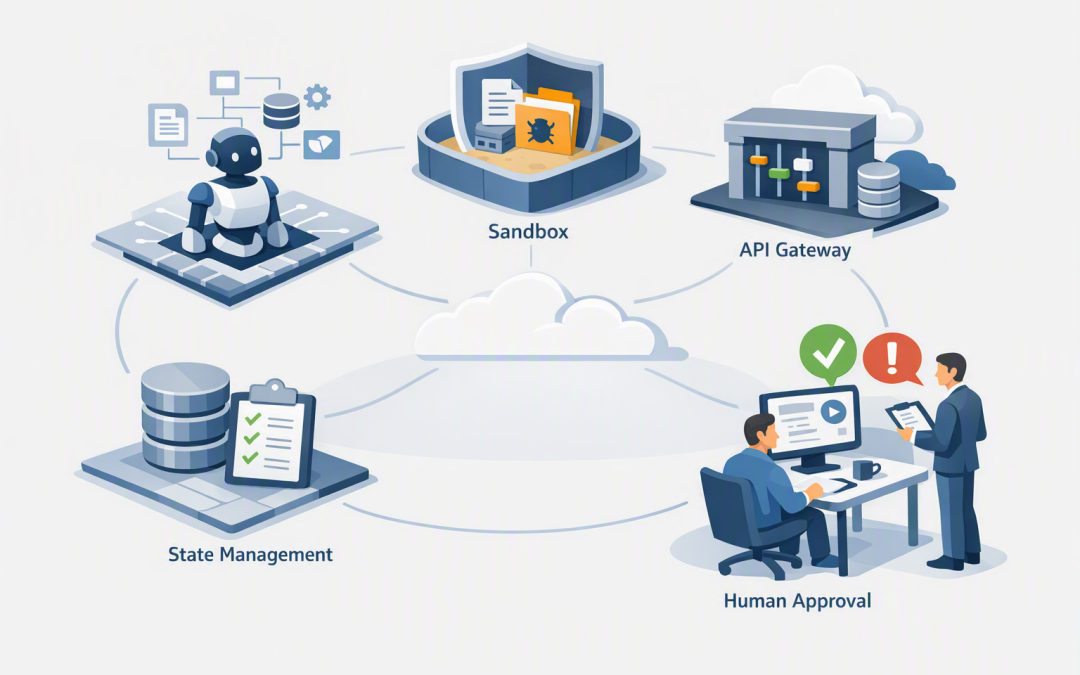
A sound Azure AI agent architecture therefore separates five responsibilities:
- The agent harness, which coordinates the workflow and applies business rules.
- The sandbox, which gives the agent an isolated place to process files or run code.
- The API gateway, which controls how the agent reaches models and business systems.
- The state layer, which stores approved conversation and workflow history.
- Human control points, which stop sensitive actions until an authorised person approves them.
This builds on our broader guide to designing secure AI agent infrastructure on Azure. Here, we are focusing on the four architectural decisions that most directly affect cost, risk and operational control.
1. Use sandboxes to contain unpredictable work
An agent may need to extract information from a spreadsheet, convert a document or write a short program to analyse data. A sandbox is a temporary, isolated computing environment where it can perform that work without receiving direct access to your production servers.
Think of it as a secure workshop. The agent receives only the files, tools and network access required for that particular job, and the workshop is cleared when the job finishes.
A properly designed sandbox should have:
- A short lifespan rather than running permanently.
- No unrestricted internet access.
- Strict limits on processing power, storage and execution time.
- Malware scanning for uploaded and generated files.
- No permanent passwords, API keys or administrator credentials.
- Logs showing what code ran and what files were created.
This limits the damage if the agent generates faulty code, processes a malicious document or misunderstands an instruction. It also prevents abandoned sessions from quietly consuming Azure resources and increasing monthly costs.
Not every agent needs this capability. Our guide to when an AI agent needs a secure sandbox helps determine whether the additional isolation is justified.
2. Put an API gateway between the agent and everything important
An application programming interface, or API, is simply a controlled way for one system to request information or actions from another. An API gateway acts like reception and security at the entrance.
In Azure, API Management can control how agents access AI models, internal applications and third-party services. It can verify identity, limit usage, block unauthorised requests, route traffic to approved services and record what happened.
This layer delivers several business outcomes:
- Cost control: Token quotas and usage limits reduce the risk of an agent making thousands of unnecessary model requests.
- Supplier flexibility: Applications can use approved OpenAI, Anthropic Claude or other models through a controlled interface rather than being tightly connected to one provider.
- Security: Internal systems do not need to be exposed directly to the agent or the public internet.
- Accountability: Logs show which agent requested an action, when it happened and whether it succeeded.
The same principle applies to business tools. An accounts agent should not receive general access to the finance platform when it only needs to retrieve an invoice status. Give it one narrowly defined API action with the minimum permissions required.
3. Treat agent state as a business record
State is the information an agent remembers between steps or conversations. It may include the user’s request, documents reviewed, decisions made, tool results and the current stage of a workflow.
Microsoft Foundry Agent Service can manage conversations and responses for multi-step interactions. However, CIOs still need to decide what should be stored, where it belongs, how long it is retained and who can retrieve it.
Saving everything indefinitely may appear helpful, but it increases privacy, security and discovery risk. Saving too little can leave the business unable to explain why an agent made a decision.
A practical design separates:
- Temporary working state that can be deleted when the task ends.
- Conversation state required to maintain useful context.
- Business records that must be stored in the official system, such as the CRM or document management platform.
- Audit records that show approvals, actions, identities and exceptions.
Do not allow the AI conversation history to become an unofficial database. Important outcomes should be written to the correct business system using a controlled and traceable process.
4. Keep people in control of high-impact actions
Human control does not mean someone must approve every minor step. That would remove most of the productivity benefit.
Instead, approval should be based on risk. Reading an approved product catalogue may happen automatically, while issuing a refund, changing payroll details, sending legal correspondence or deleting a customer record should require an authorised person.
The agent harness is the coordination layer that enforces these rules. It can pause the workflow, present the proposed action and supporting evidence, record the approver’s identity and continue only after receiving a valid decision.
This is why the harness should remain separate from the agent’s working environment, as explained in why the agent harness and sandbox should stay separate. If the sandbox is compromised, it should not be able to rewrite its own approval rules.
A simple policy might look like this:
agent: supplier-onboarding
identity: dedicated-managed-identity

sandbox:
 lifetime_minutes: 20
 internet_access: denied
 production_credentials: prohibited

tools:
 read_supplier_record:
 access: read-only
 human_approval: false

 create_supplier:
 access: restricted-write
 human_approval: finance-manager

 change_bank_details:
 access: restricted-write
 human_approval: finance-manager-plus-security-check

gateway:
 usage_limit_per_run: enforced
 approved_models_only: true
 audit_logging: enabled

state:
 temporary_working_data: delete-after-completion
 approvals: retain-under-records-policy
This is not deployable Azure configuration. It is an example of how business rules should be made explicit before developers connect the agent to production systems.
For a deeper look at approval patterns, see how an agent harness keeps Azure AI workflows under human control.
A practical 200-person company scenario
Consider a 200-person professional services firm introducing an agent to process supplier invoices. The agent reads emailed invoices, checks purchase orders and prepares entries for the finance system.
The unsafe design gives the agent a finance account, mailbox access and permission to create payments. It works quickly, but a malicious attachment or incorrect supplier instruction could produce a costly outcome.
The controlled design opens attachments in a temporary sandbox, sends all finance requests through an API gateway and stores the workflow status separately from the conversation. It may prepare an invoice automatically, but new suppliers, bank detail changes and payments above a defined threshold require human approval.
The business still saves time on data entry and matching. The difference is that management can explain who approved each sensitive action and stop one faulty agent run from becoming a financial incident.
How this supports Australian security obligations
The Essential Eight is the Australian government’s baseline cybersecurity framework for reducing common attacks. It was not written specifically for AI agents, but its principles remain highly relevant.
Sandbox restrictions support application control. Dedicated agent identities support restricted administrative privileges. Logging, patching and strong user authentication help protect the wider platform.
ASD and the Australian Cyber Security Centre also recommend understanding how AI affects privacy, data security and supply-chain risk. An architecture diagram alone is not enough; your organisation needs evidence that its controls work in practice.
Five questions CIOs should ask before production
- Can the agent reach anything it does not genuinely need?
- Can we limit model usage and prevent unexpected costs?
- Where are conversations, files and workflow decisions stored?
- Which actions require approval, and who is authorised to provide it?
- Can we reconstruct what the agent did during an incident or audit?
If these questions do not have clear answers, the agent is still a prototype, regardless of how polished the user interface looks.
Build for controlled usefulness
The goal is not to remove every possible risk or require approval for every action. It is to give agents enough freedom to create measurable productivity gains while limiting the consequences of mistakes, misuse and compromised access.
As a Microsoft Partner and Wiz Security Integrator with more than 20 years of enterprise IT experience, CloudProInc takes a practical view across Azure, Microsoft 365, Defender, identity and cloud security. We help organisations design controls that their teams can actually operate, rather than producing architecture that only looks good in a presentation.
If you are unsure whether your Azure AI agent design has the right boundaries around sandboxes, APIs, state and human approval, we are happy to take a look and identify the gaps before they become expensive.
Discover more from CPI Consulting
Subscribe to get the latest posts sent to your email.