
In this blog post How Handoffs and Agent Tools Improve Multi-Agent Sandbox Workflows we will explain how specialised AI agents can work together without receiving unnecessary access to your files, systems or sensitive business data.


The problem is that multi-agent AI can become difficult to control surprisingly quickly. One agent collects information, another runs code, a third reviews the result, and nobody can clearly explain which agent had access to what or why the final decision was made.
Handoffs and agent tools provide two practical ways to coordinate that work. Combined with isolated sandbox environments, they help businesses gain the speed of AI automation while keeping responsibilities, access and costs under control.
What is a multi-agent sandbox workflow?
A multi-agent workflow uses several AI agents, with each one assigned a defined role. You might have one agent reviewing contracts, another checking financial data and a third preparing an executive summary.
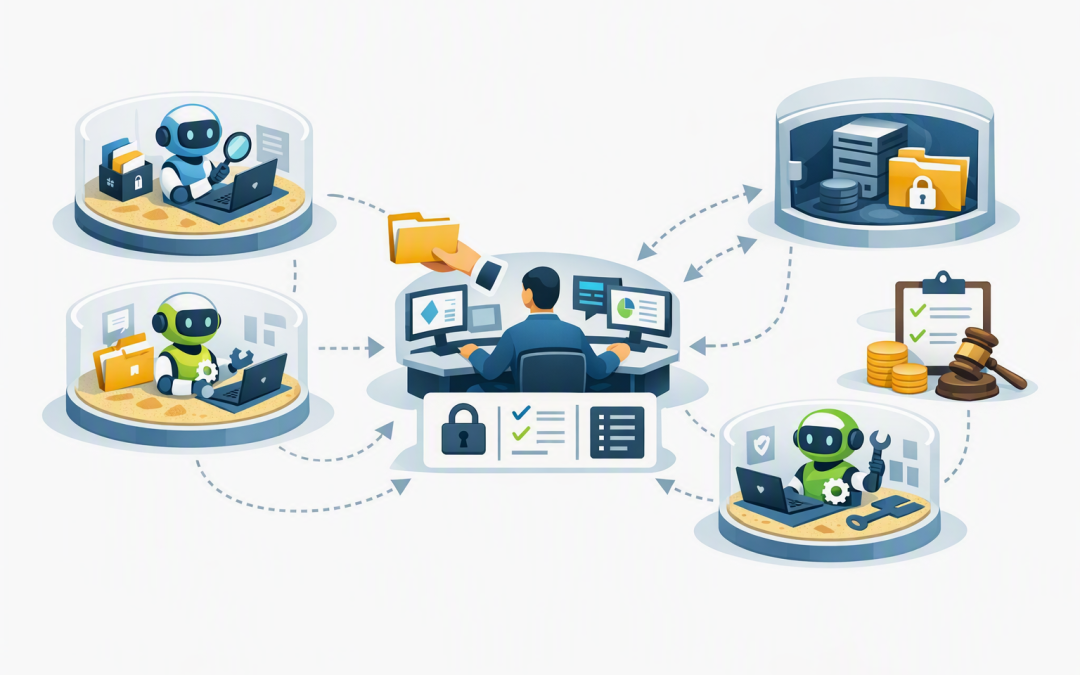
A sandbox is an isolated working environment where an agent can inspect files, run approved commands and create reports without receiving direct access to production systems. Think of it as a temporary project room containing only the information and tools required for one task.
The agent harness sits outside that room. The harness is the control layer that decides which agent runs, what it may do, when human approval is required and how activity is recorded.
Keeping these layers separate is important. We explain the security and recovery benefits in more detail in why your agent harness and sandbox compute should stay separate.
Handoffs transfer responsibility to a specialist
A handoff occurs when one agent transfers control of the current task to another agent. The receiving specialist becomes responsible for continuing the work and producing the next response.
Imagine an intake agent receiving a request to review a software repository. It identifies that the task requires code analysis and hands control to a sandboxed code-review agent with access to a temporary copy of the repository.
The intake agent does not need access to the code. It only needs enough information to route the request correctly. This reduces the number of agents that can see sensitive material and makes responsibilities easier to audit.
Handoffs work best when:
- A specialist should take ownership of the remaining task.
- The next step requires a different set of files or permissions.
- There is no need for the original agent to combine several specialist responses.
- You want a direct workflow with fewer coordination steps.
Be careful about context. A handoff can pass conversation history to the new agent, but that does not mean every message, tool result or document should be included. Filtering the information passed during a handoff reduces privacy risk, processing cost and confusion.
Agent tools keep a central coordinator in charge
An agent tool follows a different model. The specialist agent is presented to a central coordinating agent as a callable tool, much like a business application or approved function.
The coordinator remains responsible for the conversation. It sends a defined task to the specialist, receives a result and decides what to do next.
This pattern is useful when a decision depends on several perspectives. For example, a procurement coordinator could call a contract-review agent, a financial-analysis agent and a security-review agent before producing one recommendation.
Agent tools work best when:
- One agent must own the final answer.
- Several specialists need to examine the same business request.
- Results must follow a consistent format.
- The workflow needs comparison, checking or management approval.
The trade-off is additional coordination. The central agent must decide which tools to call and then process their results, potentially increasing AI usage and response time. That cost can be worthwhile when it gives the business a clearer and more consistent final decision.
For a deeper comparison of the two patterns, see how to choose handoffs or agents as tools safely.
How the technology fits together
Modern agent frameworks let developers configure an AI agent with instructions, approved tools, safety checks and optional connections to specialist agents. A sandbox-enabled agent adds an isolated filesystem and controlled ability to run commands or create files.
The following simplified Python example shows the architectural difference. It is an illustration rather than production-ready code, because sandbox providers, permissions and approval controls still need to be configured for each environment.
from agents import Agent
from agents.sandbox import SandboxAgent

reviewer = SandboxAgent(
 name="Document Reviewer",
 instructions="Review only the approved workspace files."
)

# Pattern 1: control transfers to the specialist
intake_agent = Agent(
 name="Intake Agent",
 handoffs=[reviewer]
)

# Pattern 2: the coordinator stays in control
review_tool = reviewer.as_tool(
 tool_name="review_documents",
 tool_description="Review approved documents and return findings."
)

coordinator = Agent(
 name="Decision Coordinator",
 tools=[review_tool]
)
In production, the sandbox also needs a workspace definition specifying which files are available, capabilities defining which actions are permitted, and a run configuration controlling where the isolated environment operates.
Use separate sandboxes to contain mistakes
Giving every specialist access to one shared workspace may appear efficient, but it increases risk. One agent can overwrite another agent’s output, use data outside its role or introduce files that affect later analysis.
A safer design gives each specialist its own sandbox. Only approved outputs, such as a structured summary or reviewed report, are returned to the coordinator.
This is particularly useful for sensitive document analysis, as described in how sandbox agents support secure data rooms. The same approach can isolate code review and website testing from live systems, which we cover in our guide to sandbox agents for code review and prototypes.
A practical business scenario
Consider a 200-person professional services company reviewing thousands of files before an acquisition. Staff currently copy information into spreadsheets, send questions by email and manually prepare a risk summary.
A controlled workflow could use an intake agent to classify the request. It then calls separate sandbox agents for contract risks, financial obligations and cybersecurity concerns.
Each specialist receives only the relevant documents. The coordinating agent combines their structured findings, while high-risk conclusions and any external communication require human approval.
The business outcome is not simply faster document processing. It is fewer manual hours, a repeatable review process, clearer evidence of what was checked and less chance of confidential information reaching the wrong system or user.
Build controls before increasing autonomy
A sandbox limits where work occurs, but it does not automatically make an AI workflow safe or compliant. Australian organisations still need access controls, activity logs, data retention rules and approval points that match the sensitivity of the task.
These controls can also support Essential 8 alignment, the Australian Government’s cybersecurity framework that many organisations use to reduce common security risks. In particular, restricted administrative access, controlled applications and reliable logging help demonstrate that AI agents are not operating as unmonitored privileged users.
- Define one owner for the final result. Avoid workflows where several agents can independently approve or publish an outcome.
- Give every specialist minimum access. Provide only the files, tools and credentials required for its task.
- Require structured outputs. Ask agents to return defined fields rather than long, inconsistent narratives.
- Set time and cost limits. Stop repeated tool calls, unproductive loops and unexpectedly large processing bills.
- Record every handoff and tool call. Your team should be able to reconstruct what happened when an answer is challenged.
- Keep people in high-impact decisions. Payments, production changes, legal conclusions and external messages should require approval.
Choose the pattern based on accountability
The right question is not whether handoffs or agent tools are more advanced. It is who should own the next decision.
Use a handoff when a specialist should take responsibility for completing the task. Use an agent tool when a coordinator must collect specialist findings and remain accountable for the final answer.
For workflows spanning OpenAI, Claude or other platforms, a controlled communication layer may also be required. Our article on building cross-platform multi-agent workflows with A2A explains how agents can exchange tasks without tightly coupling the entire system to one provider.
CloudPro Inc brings more than 20 years of enterprise IT experience to practical AI design across Azure, Microsoft 365, OpenAI and Claude. As a Microsoft Partner and Wiz Security Integrator, we focus on workflows that can be secured, monitored and supported in the real world rather than demonstrations that only work under perfect conditions.
If you are exploring multi-agent AI but are unsure where handoffs, agent tools and sandboxes should sit, we are happy to review the proposed workflow and identify the main cost, security and governance risks—no strings attached.
Discover more from CPI Consulting
Subscribe to get the latest posts sent to your email.