
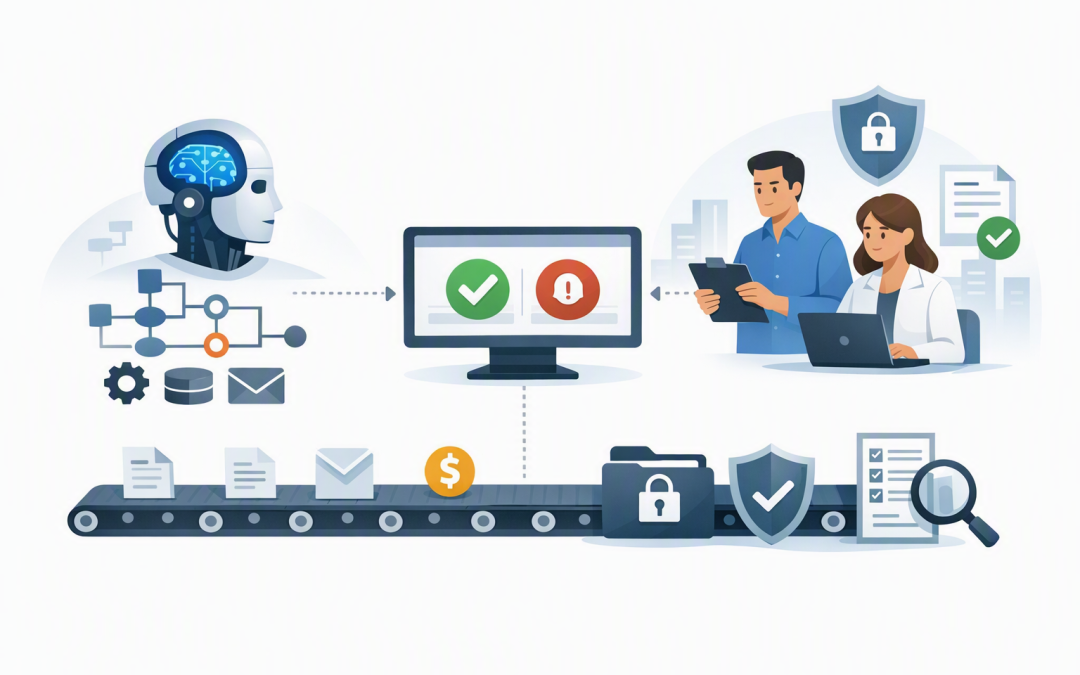
In this blog post How Agent Harness Keeps Azure AI Workflows Under Human Control we will explain how to automate complex work while keeping people involved in the decisions that carry financial, security or compliance risk.


This matters because AI becomes risky when it moves beyond drafting answers. An agent that can update customer records, approve access, send messages or trigger payments needs more than a good AI model. It needs clear boundaries, reliable memory and a controlled way to stop and ask a person for approval.
What Agent Harness actually does
A language model can generate text, but it cannot safely run a business process by itself. It needs supporting software that tells it which tools it can use, tracks what it has already done and checks whether an action is allowed.
Agent Harness is that supporting layer within Microsoft Agent Framework. Think of it as the operating structure around the AI model rather than the intelligence itself.
The harness can manage:
- Planning and task tracking so the agent can break a larger request into smaller steps.
- Tool use so it can call approved business systems, databases and application programming interfaces, which are controlled connections between software platforms.
- Conversation state so it remembers where a long-running task is up to.
- Context management so lengthy jobs do not overwhelm the model with too much information.
- Approval policies so sensitive actions pause before anything is changed.
- Monitoring so your team can see what the agent attempted, which tools it used and what happened next.
This builds on the broader capabilities discussed in our guide to Microsoft Agent Framework for real-world AI delivery. The important difference here is the focus on controlling long, partly autonomous tasks.
Why human-in-the-loop does not mean manual everything
Human-in-the-loop means the AI handles routine work but pauses when human judgement or authority is required. The aim is not to add an approval to every step, because that simply creates another slow and frustrating process.
A good workflow separates actions into risk levels.
- Low risk: Reading an approved knowledge base or summarising a document can usually happen automatically.
- Medium risk: Drafting a customer response may happen automatically, but a person reviews it before sending.
- High risk: Making a payment, deleting information, changing access or contacting a regulator always requires approval from an authorised person.
This approach gives employees back time while preserving accountability. It also prevents a well-written but incorrect AI response from becoming an expensive business action.
How the Azure workflow fits together
A practical implementation normally includes six parts.
- The AI model. A suitable model is deployed through Microsoft Foundry, Microsoft’s Azure environment for building and operating AI applications.
- Agent Harness. The harness manages planning, tool calls, task history and the agent’s working context.
- Restricted tools. The agent receives only the connections it needs, such as reading an invoice, creating a ServiceNow ticket or preparing a Microsoft 365 account change.
- An approval gate. Selected tools are marked as requiring approval before they can run.
- An approval channel. The request is sent to a controlled interface such as Microsoft Teams, a business application or a secure web portal.
- Logging and monitoring. The request, proposed action, approver, decision and result are recorded for investigation and audit purposes.
For broader infrastructure guidance, see designing secure AI agent infrastructure on Azure. Agent Harness does not replace secure Azure architecture. It sits inside that architecture and helps control how the agent behaves.
A simplified approval pattern in .NET
Microsoft Agent Framework allows a function tool to be wrapped with an approval requirement. A function tool is simply a controlled business action the agent is allowed to request.
The following simplified C# pattern shows the basic idea:
using Microsoft.Agents.AI;
using Microsoft.Extensions.AI;
using System.ComponentModel;

[Description("Submit an approved supplier payment")]
static string SubmitPayment(string invoiceId, decimal amount)
{
 return $"Payment submitted for {invoiceId}: {amount:C}";
}

AIFunction paymentTool =
 AIFunctionFactory.Create(SubmitPayment);

AIFunction protectedPaymentTool =
 new ApprovalRequiredAIFunction(paymentTool);

// Register protectedPaymentTool with the Azure-connected chat client.
// Agent Harness then manages the task, session and tool-calling loop.
AIAgent agent = chatClient.AsHarnessAgent();
AgentSession session = await agent.CreateSessionAsync();

await foreach (var update in agent.RunStreamingAsync(
 "Check invoice INV-1048 and prepare payment",
 session))
{
 // When an approval request appears, send it to an
 // authorised person. Resume only after their decision.
}
In production, the approval screen should show more than an Approve button. The reviewer needs the supplier, amount, invoice number, source records, reason for the recommendation and any unusual conditions the agent identified.
The system should also verify the reviewer’s identity and authority. Approval from an unrelated employee is not meaningful control.
Use workflows when the process must wait
Some approvals take seconds. Others may take several hours or require additional information from finance, legal or security teams.
Microsoft Agent Framework workflows can send a request outside the running process and wait for a response. The workflow state can be saved so the process resumes from the correct point instead of asking the agent to reconstruct what happened.
This is valuable for processes such as:
- Approving a customer refund above a set value.
- Confirming a change to an employee’s system access.
- Reviewing an AI-generated contract variation.
- Authorising the release of personal or commercially sensitive information.
- Escalating a cybersecurity incident for containment.
If the sequence is predictable, use a defined workflow around the agent. Let the agent decide how to research or prepare the recommendation, but let the workflow decide who can approve it and what happens after approval or rejection.
What this looks like in a real business
Consider a 180-person professional services company processing hundreds of supplier invoices each month. Staff currently compare invoice details, purchase orders and approval limits manually before entering payments.
An Agent Harness workflow could collect the records, identify mismatches, prepare a short explanation and recommend the next action. Routine invoices within policy could move forward automatically, while duplicates, changed bank details and high-value payments pause for finance approval.
The outcome is not simply faster invoice processing. Finance employees spend less time gathering information, managers receive better approval summaries and suspicious payments are more likely to receive proper attention.
Controls to put in place before launch
Start with a narrow process and apply these practical controls:
- Give the agent the minimum access required for its job.
- Separate read-only tools from tools that change data or trigger actions.
- Require approval for payments, deletions, access changes and external communications.
- Set value limits and escalation rules outside the AI prompt.
- Record every proposed action and approval decision.
- Test rejection, timeout, duplicate request and system failure scenarios.
- Review agent activity using Azure monitoring and security tools such as Microsoft Defender and Wiz.
These controls should complement Essential 8, the Australian government’s cybersecurity framework that many organisations use or are required to follow. They should also support your obligations under Australian privacy legislation, particularly when an agent handles personal information.
Our earlier article on automating repetitive processes safely with Azure AI agents explains how to choose a suitable first use case. Agent Harness adds the structure needed when that use case involves longer tasks and higher-impact decisions.
Keep the speed without giving up control
Agent Harness can help move AI from a useful assistant to a dependable participant in business workflows. The strongest implementations do not attempt to remove people entirely. They use people where judgement, accountability and authority matter most.
CloudProInc combines more than 20 years of enterprise IT experience with practical expertise across Microsoft Foundry, Azure, Microsoft 365, Defender and Wiz. As a Melbourne-based Microsoft Partner and Wiz Security Integrator, we help organisations design AI workflows that are useful, controlled and realistic to operate.
If you are considering an AI agent but are unsure where automation should stop and human approval should begin, we are happy to review the process with you — no strings attached.
Discover more from CPI Consulting
Subscribe to get the latest posts sent to your email.