
In this blog post How to Keep AI Agents from Losing Critical Business Information we will explain why AI agents forget important details, how the technology works, and what controls protect your business from missing records, repeated work and poor decisions.


The problem often appears after a successful pilot. An agent handles customer requests, prepares reports or coordinates internal tasks, but later forgets what was approved, loses the reason behind a decision or cannot find information from an earlier interaction.
That is more than an inconvenience. If employees must reconstruct the missing information, the productivity benefit disappears. If the lost detail concerns a customer commitment, financial approval or compliance decision, the business risk can be much greater.
Why AI agents do not remember everything automatically
An AI agent is software that uses a large language model, such as OpenAI or Anthropic Claude, as its reasoning engine. The agent can also connect to business systems, search approved information and complete tasks according to defined rules.
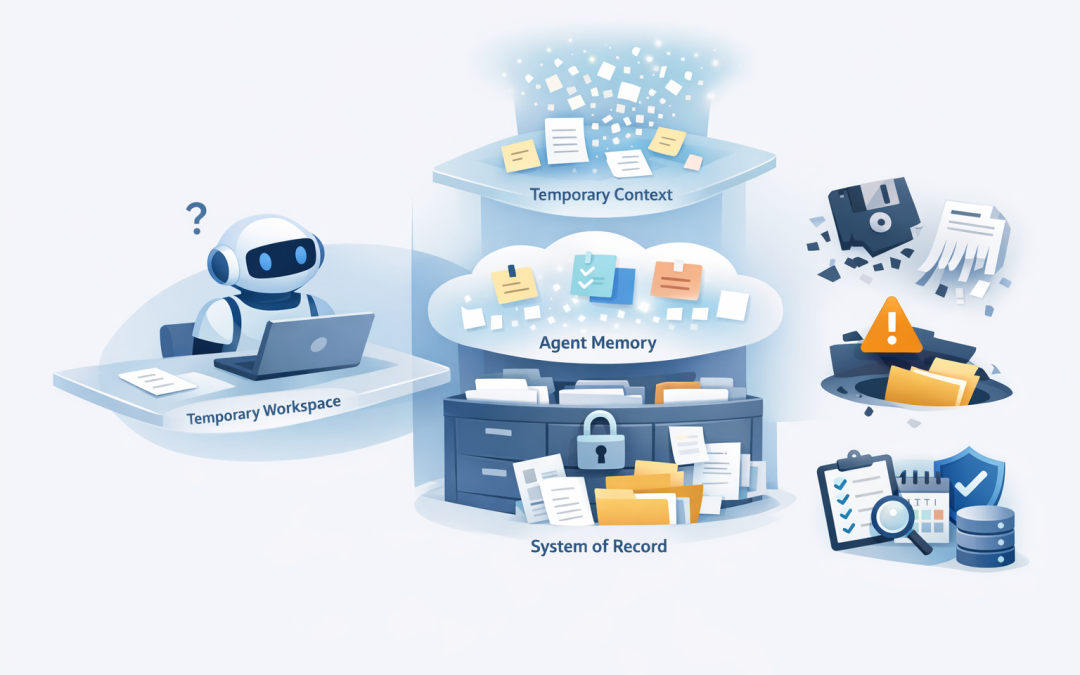
However, the language model itself is not a reliable filing cabinet. It works with a limited amount of information at a time, commonly called its context window. Think of this as the agent’s temporary workbench rather than permanent storage.
As a conversation or task grows, older information may be shortened, summarised or removed to make room. A session can also expire, a connection can fail, or the agent may search for a saved record and retrieve the wrong one.
Agent memory can help retain preferences, summaries and useful context across sessions. We covered that design challenge in how to build AI agents that remember business context safely. Preventing information loss requires an additional step: deciding which information must become a durable business record.
What causes important information to disappear
Most failures are not caused by the AI suddenly deleting everything. They come from small gaps between the agent, its memory and the systems where official records are stored.
- The information was never saved. The agent used a detail during a conversation but did not write it to permanent storage.
- A summary removed the important part. The agent kept the outcome but lost an exception, approval condition or reason behind the decision.
- The record exists but cannot be found. Poor labels, missing customer identifiers or weak search settings prevent the agent from retrieving it.
- New information replaced the old version. The business loses the history showing who changed a decision and why.
- A system failed silently. The agent continued working even though its attempt to save the information was unsuccessful.
The solution is not to save every word forever. That increases storage costs, creates privacy problems and gives the agent more irrelevant information to sort through. The goal is to retain the right information, in the right place, for the right length of time.
Five practical controls that prevent information loss
1. Define what the business cannot afford to lose
Start with business risk, not technology. Identify the information that would cause financial loss, customer disputes, compliance problems or operational delays if it disappeared.
This might include approvals, customer commitments, completed actions, contract exceptions, incident decisions and changes to financial details. Give each category an owner and define where its official record must be stored.
A customer’s communication preference may belong in agent memory. A signed contract variation belongs in the document management or customer relationship system. The agent can remember the preference, but it should retrieve the contract from the authoritative source.
2. Separate working context, memory and official records
A reliable agent normally needs three information layers. Mixing them together is one of the most common design mistakes.
- Working context contains the information needed for the current conversation or task.
- Agent memory retains useful facts and summaries across sessions.
- The system of record holds the official version of approvals, transactions, documents and completed work.
The system of record could be Microsoft 365, SharePoint, Dynamics 365, an Azure database, a service management platform or another approved business application. It should remain the source of truth even if the agent’s temporary context is lost.
3. Make the agent save before it acts
For important workflows, the agent should confirm that a record was saved successfully before it sends a final response, updates another system or moves to the next step.
A simple workflow might look like this:
WHEN a customer decision is confirmed
1. Check that the customer, decision and approver are recorded
2. Write the decision to the approved business system
3. Confirm the storage ID, date and version
4. Update the agent's short summary
5. Record the result in an audit log
6. Continue only if the save was successful
7. Alert a person if any step fails
This approach prevents a dangerous situation where the agent tells a user that something is complete when the underlying record was never created.
For longer tasks, add checkpoints after major steps. If the agent stops halfway through, it can restart from the last confirmed checkpoint rather than repeating the entire process or guessing what happened.
4. Store enough detail to retrieve the correct record
Saving information is only half the job. The agent must also be able to find the right version later.
Each important record should include practical labels such as the customer or project identifier, information type, owner, creation date, last updated date, source and retention category. Version history should show what changed rather than simply overwriting the previous entry.
Many agents use semantic search, which finds information based on meaning rather than exact words. It is useful, but it should be combined with structured filters. An agent looking for a contract approval should search by meaning while also checking the correct customer, project, date and document type.
For high-risk decisions, the agent should show where the information came from and how current it is. If the source is missing, outdated or conflicting, the agent should ask a person rather than invent an answer.
5. Back up, monitor and test the complete information chain
Agent information can sit across several services, including conversation history, memory stores, databases, search indexes and connected business applications. Your backup plan must cover every component required to restore the workflow.
This supports the Essential Eight, the Australian government’s cybersecurity framework that many organisations use as a baseline. Regular backups are one of its eight strategies, but having a backup is not enough. Your team must test that the information and the agent’s connections can actually be restored.
Monitoring should also detect failed saves, incomplete records, unusual deletion activity, retrieval failures and sudden changes in the amount of information being stored. These events should create an alert that a person can investigate.
Retention rules matter as well. The Australian Privacy Principles require organisations to protect personal information and consider whether it still needs to be retained. An agent should not become an uncontrolled archive of customer and employee conversations.
A practical example for a 200-person business
Consider a 200-person professional services company using an AI agent to handle project handovers. The agent prepares summaries, records open actions and tells the next team what the customer has approved.
During testing, the summaries look excellent. In production, however, the team discovers that special pricing conditions are sometimes dropped when long conversations are shortened. Staff must reopen emails and meeting notes before continuing the work.
If 400 handovers each require 15 minutes of reconstruction, the business loses 100 hours. More importantly, one missed pricing condition could create a customer dispute worth far more than the time cost.
The fix is not a larger prompt. The company defines pricing exceptions as critical records, saves them to the project system before completing the handover, adds version history and alerts the project manager if the save fails. The AI summary remains helpful, but it is no longer the only copy of the decision.
Questions to ask before putting an agent into production
- Which information would cause real business harm if it disappeared?
- Where is the official source of truth for each information type?
- Can the agent confirm that a record was saved successfully?
- Does the system keep version history and an audit trail?
- Can access be removed immediately when a user’s role changes?
- Are backups protected and regularly tested?
- What happens when the agent finds conflicting or incomplete information?
- Can personal information be corrected, deleted or de-identified when required?
These information controls should sit alongside the safeguards discussed in the hidden security risks of AI agents. Reliable memory without proper access control can preserve information while exposing it to the wrong people.
Treat agent memory as part of your business architecture
The safest principle is simple: an AI agent’s conversation history is not your business record. Critical information should be deliberately identified, saved to an approved system, confirmed, backed up and tested.
CloudProInc brings more than 20 years of enterprise IT experience to this work, combining practical AI knowledge with Microsoft Azure, Microsoft 365 and cybersecurity expertise. As a Microsoft Partner and Wiz Security Integrator, we help organisations connect agents to business information without creating another uncontrolled data store.
If you are unsure whether your AI agent could lose an approval, customer commitment or important operational decision, we are happy to review the information flow and highlight the gaps. No strings attached.
Discover more from CPI Consulting
Subscribe to get the latest posts sent to your email.