
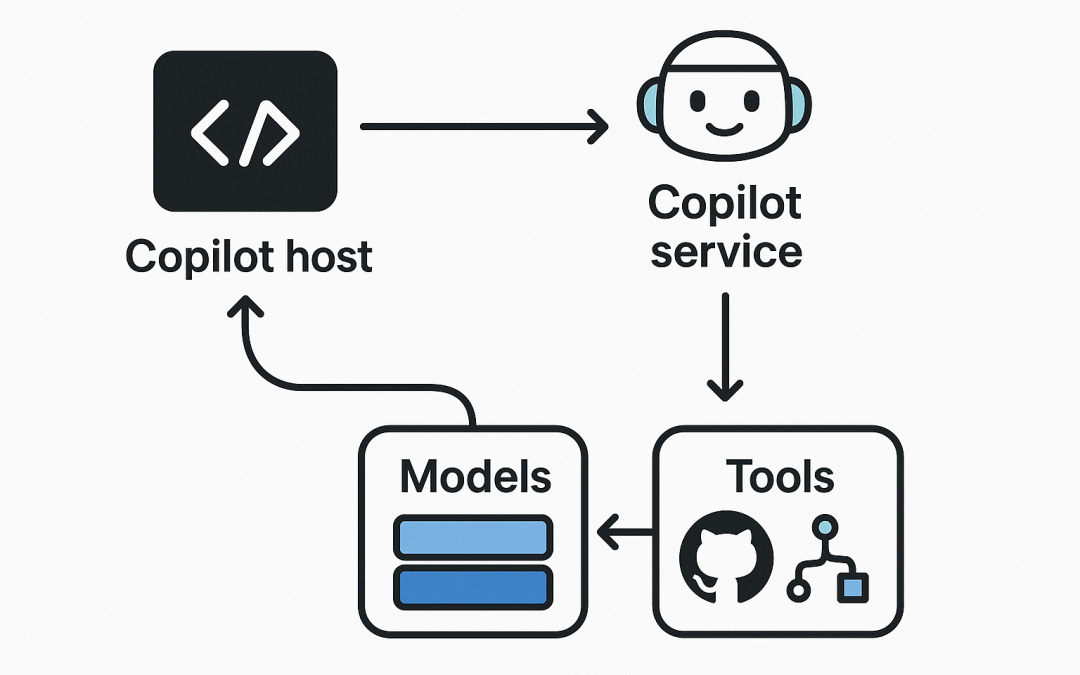
In this blog post GitHub Copilot SDK Architecture Explained for Teams and Builders we will walk through the moving parts that make Copilot integrations work, and how to design them so they stay secure, maintainable, and useful for real teams.
At a high level, GitHub Copilot is not “one model in your editor.” It’s a workflow: your IDE or GitHub UI collects context, the Copilot service selects an interaction mode (chat, inline, or agentic execution), and then it may call tools (like GitHub or Playwright) to fetch data or take actions before producing an answer. Newer Copilot capabilities increasingly rely on a tools layer built around Model Context Protocol (MCP), which standardises how an assistant discovers and uses external tools.
If you’ve heard “Copilot SDK” mentioned, it typically refers to this integration surface: the ways you extend Copilot with your organisation’s systems (tickets, runbooks, deployments, internal docs) using a tool protocol (MCP) or IDE-specific extension points. GitHub has also been explicit that GitHub App-based Copilot Extensions are being sunset, while MCP and VS Code extensions remain supported—so it’s worth designing with that direction in mind.
What problem the Copilot architecture is solving
Most AI assistants fail in the same two places:
- Context is missing: the model can’t see your repo, coding standards, or the conversation history that explains why this change matters.
- Actions are unsafe: the assistant can’t safely query internal systems or run repeatable operations with least-privilege access.
Copilot’s architecture tackles both by separating concerns:
- Clients (VS Code, JetBrains, GitHub web/mobile, CLI) gather context and present UX.
- Copilot service handles model orchestration and prompt construction.
- Tools layer (increasingly MCP-based) provides well-defined capabilities the assistant can call.
- Policy and admin controls determine what’s allowed for users and organisations.
The main technology behind modern Copilot integrations: MCP
Model Context Protocol (MCP) is an open standard that defines how applications share context with LLMs and how assistants can call external tools. In Copilot, MCP servers expose tools that the assistant can invoke. For Copilot Chat, MCP can also expose resources that users add to chat context (depending on client support).
One practical takeaway: instead of baking “Jira integration” or “ServiceNow integration” into a one-off extension, you can expose a stable set of tools via an MCP server and reuse them across multiple assistants and hosts.
MCP in Copilot coding agent vs Copilot Chat
GitHub’s documentation draws an important line:
- Copilot coding agent currently supports tools from MCP servers (and notably does not support MCP resources/prompts in the same way).
- There are also current constraints around remote MCP servers using OAuth for coding agent scenarios.
For architects, this means you should design MCP tools to be self-contained and automation-friendly, especially if you want agentic execution.
Copilot architecture: the layers you should design for
1) The host client layer
This is where the developer interacts with Copilot:
- VS Code / JetBrains IDE chat panels and inline chat
- GitHub web and mobile experiences
- Terminal workflows (Copilot in CLI is evolving quickly, including a move away from older CLI extension approaches) (github.blog)
Clients differ in what context they can collect and what actions they can present cleanly (buttons, diffs, approvals). You should assume variability and keep your integration logic in the tool layer, not the UI.
2) Context assembly and grounding
Copilot performs best when it has:
- Repository context (files, symbols, errors)
- Conversation context (what you tried, what failed, what matters)
- Organisational context (coding standards, security constraints, platform conventions)
Where possible, encode team standards into:
- Clear repo documentation (CONTRIBUTING, architecture notes)
- Repeatable tool calls (e.g., “fetch runbook”, “check deployment status”)
3) Model orchestration
Copilot can use multiple underlying models, and the available set changes over time. GitHub has been actively evolving model access and agent experiences, including adding additional agent options in public previews and adjusting which models are available. (theverge.com)
Architecturally, this is exactly why a tools-first approach matters: if the model changes, your tool contracts should remain stable.
4) The tools layer (your “Copilot SDK” sweet spot)
Tools are where your organisation adds real leverage. In Copilot’s world, MCP servers are becoming the standard way to provide tools such as:
- Search internal docs
- Create or query tickets
- Check feature flags
- Trigger safe deployment operations
- Query CI results and logs
GitHub also ships default MCP servers for some agent experiences, including a GitHub MCP server (repo-scoped, read-only by default) and Playwright for web interactions.
5) Policy, permissions, and auditability
For tech leaders, this is the layer that determines whether Copilot is a productivity tool or a risk. Examples of controls include:
- Organisation policies for whether MCP servers are allowed (and that the policy can be disabled by default depending on plan).
- Token scoping: default tokens may be read-only and repo-scoped, with options to broaden access carefully.
Design goal: least privilege by default, and make privileged operations explicit.
A practical reference architecture for an MCP-based Copilot integration
Here’s a simple, scalable pattern that works for most teams:
- Copilot Host (VS Code / GitHub) uses Copilot Chat or an agent.
- MCP Server (your service) exposes a handful of tools with tight schemas.
- Integration Adapter inside the MCP server talks to Jira/ServiceNow/Confluence/Datadog/etc.
- Auth and Policy enforce who can do what (read vs write tools; environment restrictions).
- Observability logs tool calls, inputs/outputs (redacted), latency, and error rates.
Tool design tips that make Copilot actually useful
- Prefer 5–15 sharp tools over 100 vague ones.
- Make tools deterministic: same input should yield same output.
- Return structured data (JSON-like objects) so the assistant can reason reliably.
- Separate read tools from write tools (and gate writes more aggressively).
Example MCP server tool set (conceptual)
The exact SDK code varies by language and MCP framework, but the shape is consistent: define tools with names, input schemas, and handler functions.
// Pseudocode: MCP tool definitions (conceptual)

tool "runbook.search" (query: string, service?: string) -> { results: Runbook[] }
tool "incidents.latest" (service: string) -> { incidents: Incident[] }
tool "deploy.status" (environment: "dev"|"staging"|"prod", service: string) -> { state: string, version: string }

// Write tools should be separate and tightly controlled
tool "ticket.create" (project: string, title: string, body: string, severity: string) -> { id: string, url: string }
When Copilot can call tools like these, your prompts become simpler: “Check the latest incident for payments-api and summarise impact,” and the assistant can actually fetch the answer instead of guessing.
Migration note for teams who built Copilot Extensions
If you previously invested in GitHub Copilot Extensions via GitHub Apps, plan a transition. GitHub has published a sunset timeline where GitHub App-based Copilot Extensions are disabled in November 2025, while VS Code Copilot extensions are not affected. For many teams, MCP servers are the cleanest replacement path.
Implementation checklist for IT leaders
- Pick your first 2 use cases: e.g., “incident triage” and “release readiness.”
- Design your tool contracts: inputs/outputs, error handling, and timeouts.
- Decide where the MCP server runs: local vs hosted, network access rules, secrets management.
- Apply least privilege: read-only first; introduce write tools later with approvals.
- Turn on logging: tool call metrics, redaction, and audit trails.
- Roll out with guardrails: pilot group, documented do/don’t prompts, feedback loop.
Wrap-up
The simplest way to think about “GitHub Copilot SDK architecture” is this: Copilot is the conversational brain, MCP is the tool contract, and your integration is the muscle. If you invest in a clean tools layer (schemas, permissions, observability), Copilot becomes dramatically more reliable—regardless of which model is in fashion this quarter.
If you’d like, tell us what systems you want Copilot to connect to (Azure DevOps, Jira, ServiceNow, Confluence, GitHub Issues, Datadog, Splunk), and we can map a minimal MCP tool set that delivers value in the first sprint.
Discover more from CPI Consulting
Subscribe to get the latest posts sent to your email.